Solstice Run
2025·Adventure

Your films. Your people. Your kind of evening.
Meet the native Plex player that makes every screen feel like the best seat in the house.

Your Plex library.
With a little more possibility.
THE JOY OF FINDING SOMETHING
A home for everything you love. And the things you forgot you loved. Follow a genre, explore a filmmaker, or let Surprise Me pick tonight’s adventure.
2025·Adventure
2025·Sci-Fi
2024·Animation
2025·Comedy
2025·Thriller
2025·Drama
BUILT AROUND PRESSING PLAY
A thoughtful player for the way you actually watch. Powerful when you need it. Quiet when you don’t.
 FROM THE NATIVE APP
Play, pause, seek, change speed, and fit the picture to your screen. Controls recede so the story can take over.
EVERY WORD. YOUR WAY.
Fine-tune the words without getting in the way of the picture. Try the controls below and see the difference, instantly.

Appearance options apply to supported text subtitles. Original ASS styling and bitmap subtitles retain format-specific behavior. This still-image demo illustrates appearance and timing settings.
NATIVE, WHEREVER YOU WATCH
One familiar experience, thoughtfully adapted to the screen in front of you.
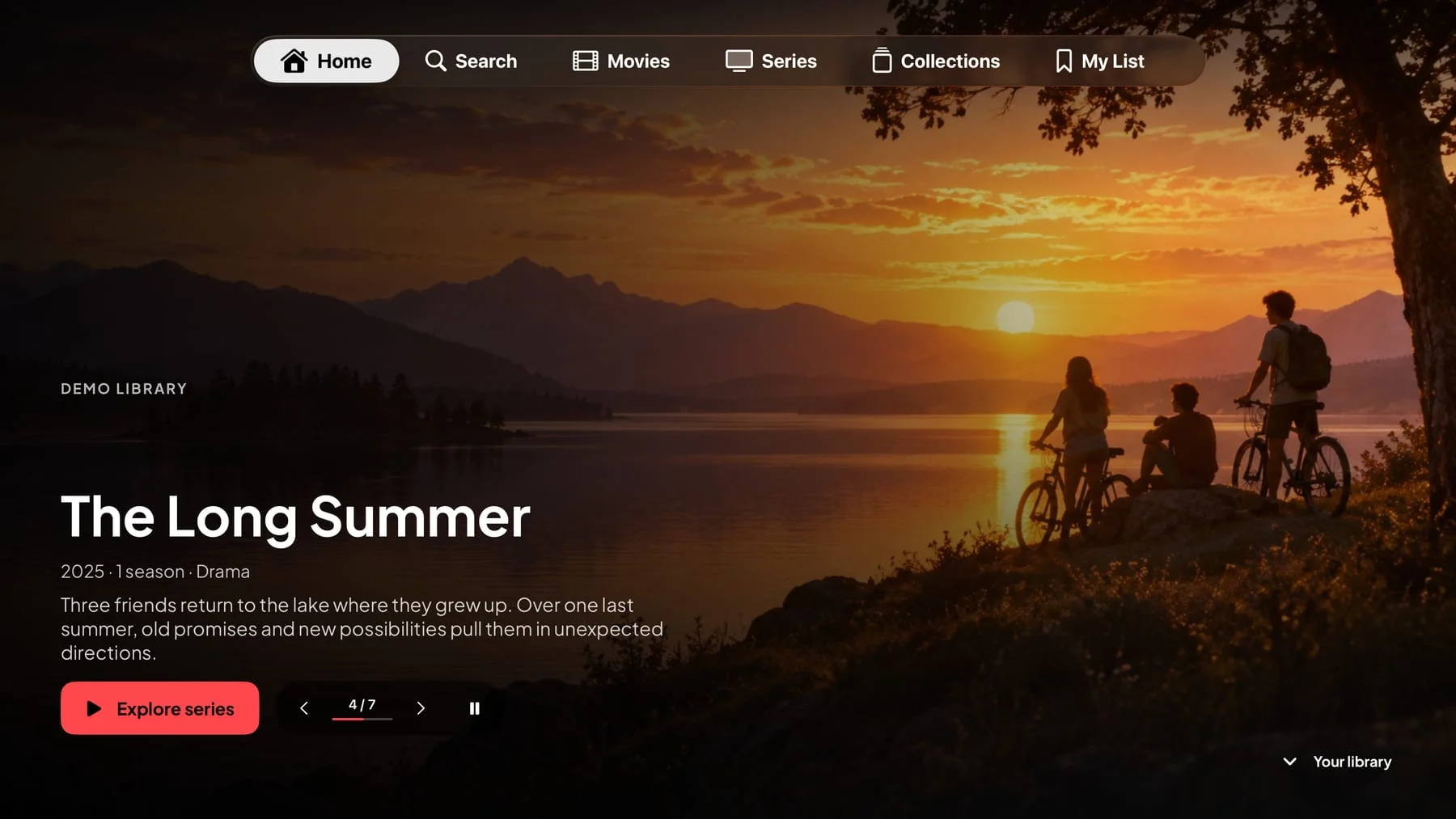
A cinematic, full-screen library. Comfortable remote navigation. Big artwork that makes the most of the big screen.
Development capture · Public release forthcomingDISTANCE IS OPTIONAL
Start Watch Together from a film or episode. Invite your Plex friends, get everyone ready, and share the play, pause, and ‘wait, go back’ moments.
Each viewer needs their own library access. Availability depends on Plex’s room service and applicable playback entitlements.

The Long Summer · Movie night
Try the waiting room. No invitation is sent.
THOUGHTFUL, ALL THE WAY THROUGH
Explore Plex collections, primary genres, and filmmaker discoveries. Follow real cast and crew into more of your library.
Keep a private My List and custom lists. Give each one a name, arrange the order, and come back when the mood is right.
Real ratings when supplied by Plex, trailers when available, watched progress, and the details behind your selected version.
Choose your accent and content spacing. Tune playback and caption preferences until the app feels like your place.
YOUR LIBRARY IS ALREADY THE HARD PART
Use Plex’s sign-in flow. On TV, scan the QR code with your phone instead of typing a password with the remote.
Xelp connects directly to Plex. No companion app. Your server must be reachable.
A FEW THINGS WORTH KNOWING
The essentials, before your first movie night.
Xelp is an independent native app for watching and exploring your Plex library. Your Plex Media Server continues to store and serve your media; Xelp gives it a new viewing experience on Apple and Android.
No. You need a Plex account and access to a library you own or have permission to use. The fictional films and series on this website are original demo content used to show the interface. They are not a streaming catalog.
No. The native apps connect directly to Plex. Your Plex Media Server still needs to be online and reachable, but ordinary Xelp use does not require a Mac companion or a USB connection.
Yes. Start Watch Together from a movie or episode, invite eligible Plex friends, and get ready together. Play, pause, and seeking are shared; volume and subtitles stay personal. Each person needs their own library access and any applicable Plex playback entitlement. The feature depends on Plex’s room service.
For supported text subtitles, adjust font, size, color, opacity, background, edges, position, height, and timing. Add a second track with its own timing. Styled ASS and image-based subtitles have format-specific behavior; their original artwork cannot support every text appearance option. Xelp does not burn subtitles into the video.
Xelp sends viewing progress, watched state, personal ratings, and primary track selections back to Plex. Your other compatible Plex clients can use that same information. Private lists are backed by Plex cloud Lists for eligible full Plex accounts.
Compatible 4K playback is implemented. Actual HDR and audio output depend on the source, device, display, receiver, network, and server. Xelp can play directly, remux, or request server conversion as needed. HDR10+ output is not yet verified across platforms, and universal HDR or surround support is not promised.
Xelp is currently in development across Apple and Android. Public App Store, Google Play, and direct-download availability have not been announced. Pricing has not been announced either. This page is a hands-on product preview.
No. Xelp is an independent product and is not affiliated with, endorsed by, or sponsored by Plex, Inc. Plex is a trademark of Plex, Inc.
GOOD THINGS ARE TAKING SHAPE
Xelp is in development for Apple and Android. Explore what’s being built, and find public release details here when they’re announced.
Public downloads and pricing haven’t been announced. No store release is available from this preview.